Kanban Pro for Zendesk
Zendesk tickets are pinned on the board. Visualized. Organized. Solved!
7-day free trial 6$ per agent per month
Trusted by the world's biggest brands


Trusted Way to Manage Zendesk Tickets Visually
Zendesk Kanban helps support teams move beyond static ticket views. Instead of switching between lists and filters, your team can see ticket progress at a glance and take action instantly.
Whether you manage incidents, customer requests, or internal workflows, the Kanban board keeps everyone aligned.

Key Features
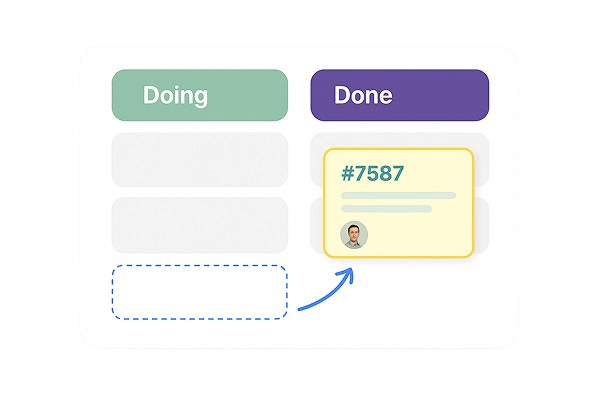
Move your tickets as cards through the board
Tickets are well organized in a simpler and more visual way. Each column represents a ticket status, making it easy to understand progress in real time.
Improved user experience
No manual updates, no extra steps — changes are reflected instantly in Zendesk.
Group similar tickets to within specific boards, and create new tickets inside the app
Kanban Pro integration is a self-sufficient tool for customer support. Use it instead of Views tab.
Turn queues into clear, visual boards
Group similar tickets into dedicated boards based on priority, type, or team — and create new tickets directly inside the app.
Kanban Pro is more than a visualization layer
It’s a complete workflow management tool for customer support — use it instead of the Zendesk Views tab.
Key Features
View all your Zendesk tickets in a clean, intuitive Kanban board.
Move tickets between statuses with a simple drag & drop.
Do any operations with tickets directly from the app.
Agents focus on resolving tickets, while managers gain a clear overview of workload, bottlenecks, and progress.
By visualizing ticket flow, teams reduce backlogs, spot blockers early, and resolve tickets faster — without leaving Zendesk.
Get started with a free 7-day trial
Enjoy seamless integration with Zendesk Support and a user-friendly interface that makes managing tickets easier!
Try Kanban Pro for FreeWhy Use Kanban in Zendesk?
Traditional ticket lists hide context.
Kanban makes work visible.
Kanban makes your work visible and organizes ticket flow
Create your own or shared board based on different conditions. Select one or more conditions to extract needed tickets to the board or create new tickets directly inside the app.
Limit the volume of work in progress
Sort tickets by priority and status to highlight the most important and drive their closure. With Kanban Pro, your work is organized in cards; they are not just a list in the Zendesk Views tab.
Encourage collaboration s
Develop a culture of healthy competition and team cooperation among your agents. With Kanban Pro, your agents are moving smoothly through the stages.
Frequently asked questions
Everything you need to know about the product and billing
Expand your Zendesk opportunities
per month
- More than 5 Statuses
- More than 10 Boards
- Integration with Zendesk tickets
- Restrictions Management
Features
| Feature | Kanban Plan |
|---|---|
| Key Features | |
| Drag-and-Drop Ticket Management | ✓ |
| Personal Boards | ✓ |
| Shared Boards | ✓ |
| Multi-Board Management | ✓ |
| Custom Status Columns based on Zendesk Statuses | ✓ |
| Advanced filtering | ✓ |
| Access Management | ✓ |
| Services & Support | |
| Training & Onboarding | 4 sessions |
| Dedicated account manager | ✓ |
| Customization | |
| Extra customization to suit your business | ✓ |
Transform your Zendesk® services today - let's take the first step!
Discover how GrowthDot can boost your team
engagement and enhance customer satisfaction.



