France and Italy have introduced new requirements around email open tracking, and Zendesk teams are asking whether they need to change anything. We've added new controls to the Email Tracking app so you can turn tracking off for recipients in these countries while keeping it on for everyone else.
What changed
Regulators in both countries now treat tracking pixels in emails as a technology that can require consent, similar to tracking technologies used on websites.
France
The CNIL adopted its recommendation on tracking pixels on March 12 and published it on April 14, 2026. Organizations had three months, until July 14, to inform contacts whose addresses were collected before that date. In July, the CNIL also published a 27-question FAQ that clarifies how the rules apply in practice.
France expects consent for tracking to be separate from the marketing opt-in. The rules apply to recipients in France wherever your company is based, and that includes emails sent to work addresses, which matters for B2B support teams.
Italy
The Garante adopted its guidelines on tracking pixels on April 17, and they were published in the Official Gazette on April 29, 2026. Companies have six months from that date to adjust, which means the end of October 2026.
Italy allows consent for tracking to be requested together with consent for marketing emails, as long as the request is clear. Recipients should also be able to turn off tracking without unsubscribing from your emails.
The difference between France and Italy
The main difference is how consent is collected.
France requires tracking consent to be separate from the marketing opt-in, so a recipient gives consent to marketing emails and tracking in two distinct steps.
Italy allows both to be requested together, as long as the request is clear. It also expects recipients to be able to turn off tracking without unsubscribing from emails.
For a team communicating with customers in both countries, this means one consent setup may not work for every situation. That's one reason a per-country tracking control can be useful.
How this affects Zendesk teams
Most teams don't think of ticket replies as email marketing. But if you use Email Tracking, those emails contain a tracking pixel, and the same privacy considerations can apply regardless of whether the message is a campaign or a support reply.
- Agent replies and follow-ups: read receipts and Seen/Unseen views tell agents when to follow up. That relies on open tracking.
- Proactive campaigns: if you send campaigns to customer lists and track opens, you're closer to a traditional email marketing use case, where consent is especially important.
- Engagement reports: open rates by agent or team are based on email open tracking.
The exemptions in the CNIL's guidance are narrow, and tracking open rates generally requires consent. Whether a particular use in your support workflow qualifies for an exemption is something to confirm with your legal team.
How to handle it with Email Tracking for Zendesk
You don't have to choose between tracking everyone and stopping tracking entirely. In the Compliance section of the app settings, you can control tracking by recipient location:
- Disable tracking for EU residents: turns tracking off for recipients in all EU countries. This is the simplest option if you want one rule across the EU.
- Disable tracking for France residents: turns tracking off only for recipients in France.
- Disable tracking for Italy residents: turns tracking off only for recipients in Italy.
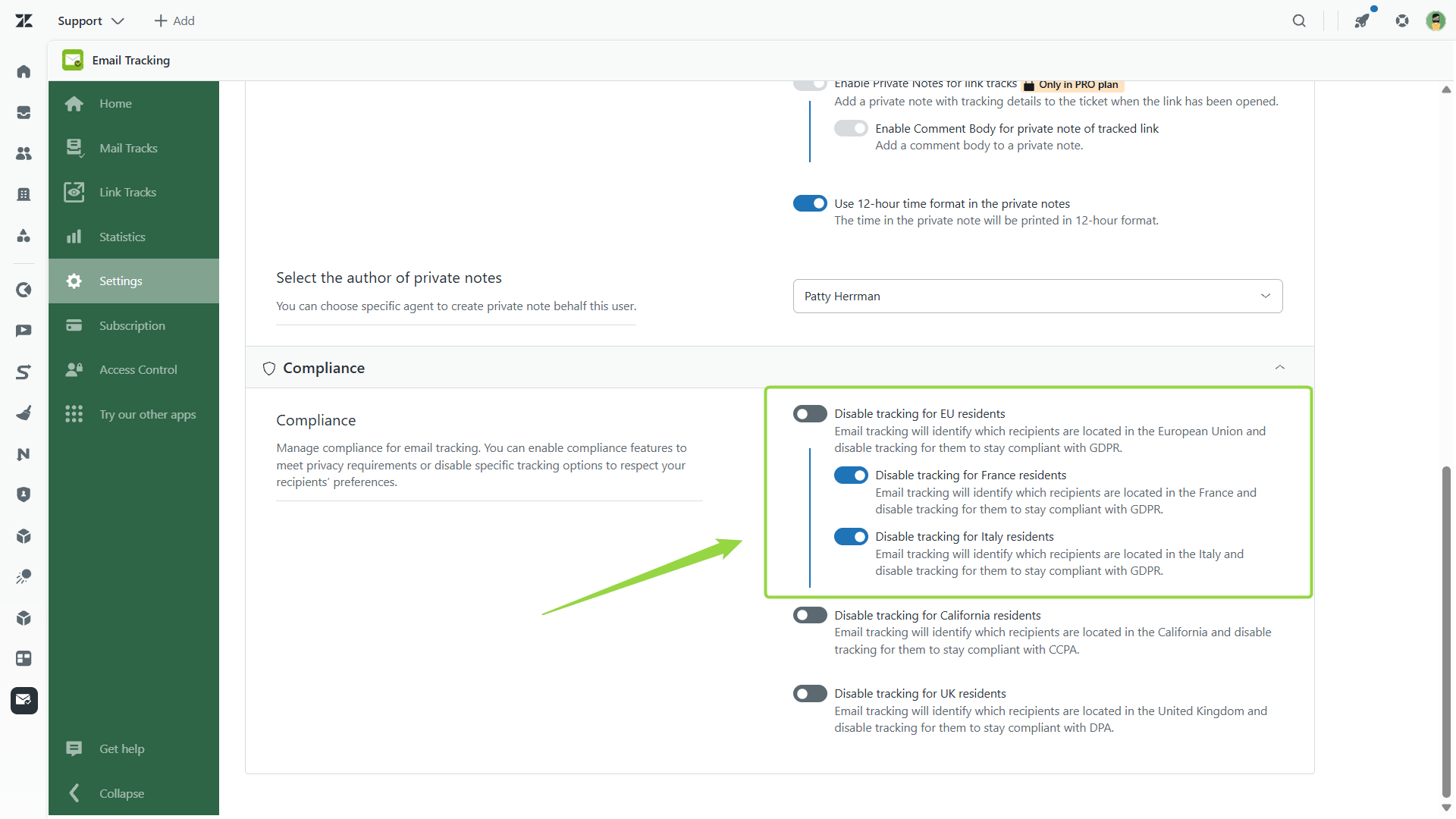
Tracking stays on for other regions. The UK and California options are also available as before.
Which option should you pick?
| If your team... | Consider |
| Wants one simple rule for all of Europe | Disable tracking for EU residents |
| Has customers in France or Italy and wants tracking to continue elsewhere in the EU | Disable tracking for France and/or Italy |
| Doesn't email anyone in these countries | No change needed |
Other practical steps for your team
Changing the tracking settings is only part of the process. The rules also cover consent and transparency, so there are a few things to review outside the app.
- Find out where your recipients are. Check how many of your customers and contacts are in France and Italy.
- Review how you collect consent. If your sign-up forms or onboarding don't ask for tracking consent, switching tracking off for these countries is the safest default.
- Update your privacy policy. Both regulators expect people to be told clearly that tracking happens and why.
- Talk to your legal team or DPO. This post explains what changed and what we've added. It isn't legal advice.
Let’s sum up
France and Italy now treat the tracking pixel in an email like a cookie, so tracking opens generally needs the recipient's consent. The two countries differ on how that consent is collected, which is why one setup may not fit both.
In Email Tracking for Zendesk, you can switch tracking off for France, Italy, or the whole EU, and keep it on for everyone else. For Zendesk teams, that means emails, follow-ups, and campaigns can keep running, with no open data for recipients in the countries you restrict.
If you're not sure which setting fits your team, start with where your recipients are and how you collect consent today, then check with your legal team.
If you need any help regarding that, contact our support team.