2 minutes read
Customer opened the email but I didn’t get the read receipt
-
Email Tracking

June 21, 2019
There are times when the Email Tracking app may not capture email opens. Here are some of the common reasons for that.
The email client/browser does not allow showing images
Email Tracking sends a pixel that helps determine whether the email was opened. In certain situations, the trigger may not work. Specifically, this may happen because:
- The customer's email client either has HTML disabled or blocks images by default.
- The user has not allowed the image to be shown. Sometimes, email clients don’t display images automatically. Instead, they ask if the user wants to see it.
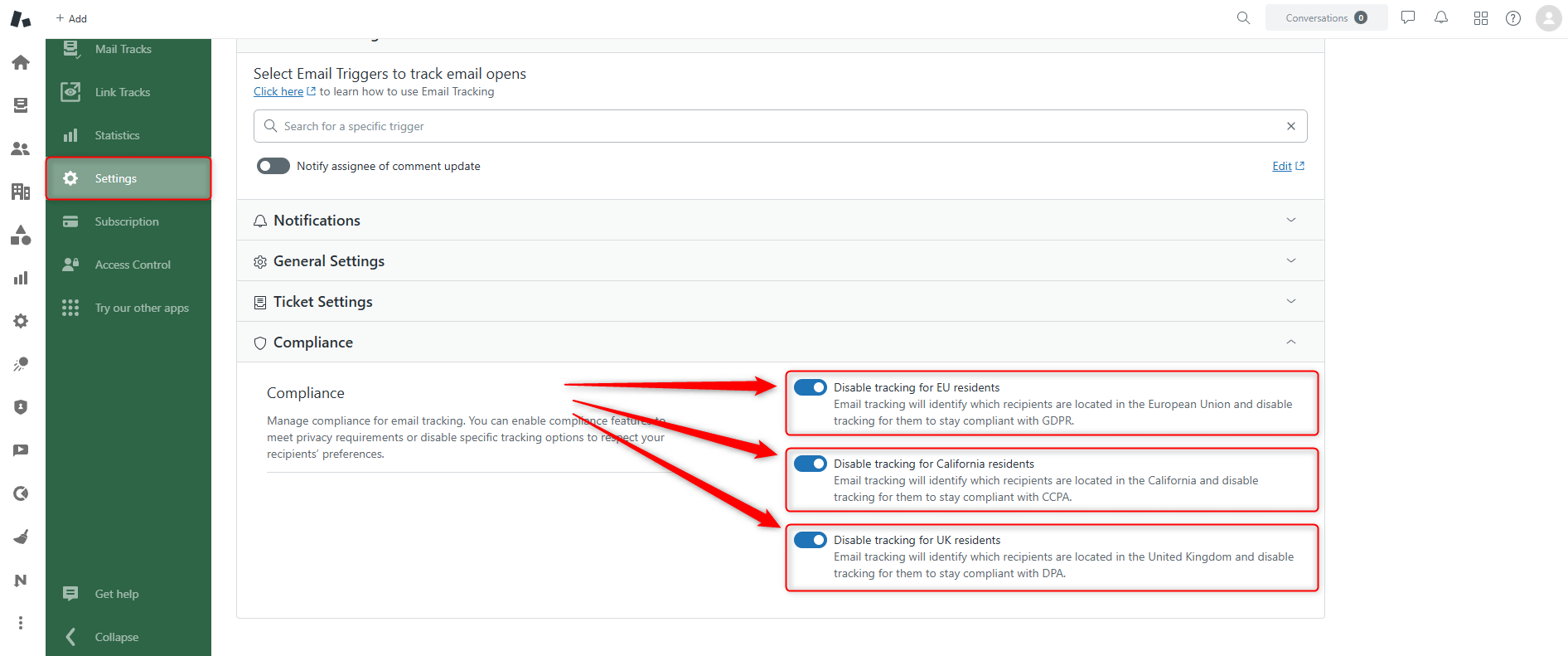
- "Disable tracking for EU recipients," "Do not track email opens of California residents to stay compliant with CCPA," or "Disable tracking for UK residents" features are on.
These features help you comply with GDPR if you work with customers in the European Union, the United Kingdom, or California. What it does is check the recipient's IP address before recording their actions. If the recipient is from the EU or California, then Email Tracking does not generate a read receipt. Check if these options are on to understand if that's what's causing the problem.
Should you have any other questions? Leave us a message



