If you’re like most Zendesk agents, the answer is: more than you’d like to admit.
Customers don’t always see your messages right away. And without knowing who’s engaged, it’s easy for tickets to stall, follow-ups to slip, and SLAs to take a hit.
There’s a more innovative way. By combining two Zendesk apps, Email Tracking and Kanban Pro, you can turn email engagement into a visual, actionable workflow. Instantly see which tickets need attention, prioritize smarter, and keep every conversation moving.
The Challenge of Tracking Email Engagement in Zendesk
If you work in Zendesk, you know the drill: you respond to tickets, hit Send, and then… wait. And wait. Did the customer see your email? Did they even open it? Or are you just staring at a ticket that’s gone cold?
It’s frustrating because your workflow depends on it. You can’t prioritize what’s urgent if you don’t know who’s actually engaged. You might spend time following up on tickets no one has seen, while others that truly matter slip through the cracks.
As a result, a lot of unresolved tickets, more internal back-and-forth, and a team that constantly feels like it’s playing catch-up. Moreover, customers notice the delays too, which can hurt satisfaction scores. For Zendesk agents juggling dozens of tickets every day, this is a very real, everyday pain point.
How to See Who Opened Your Emails in Zendesk
Of course, there is a solution: the Email Tracking app. Instead of sitting there, wondering if your customer actually opened your message, you get clear, real-time insights right inside Zendesk.
With the app, every ticket shows a Seen/Unseen status that updates automatically when a customer opens your email.
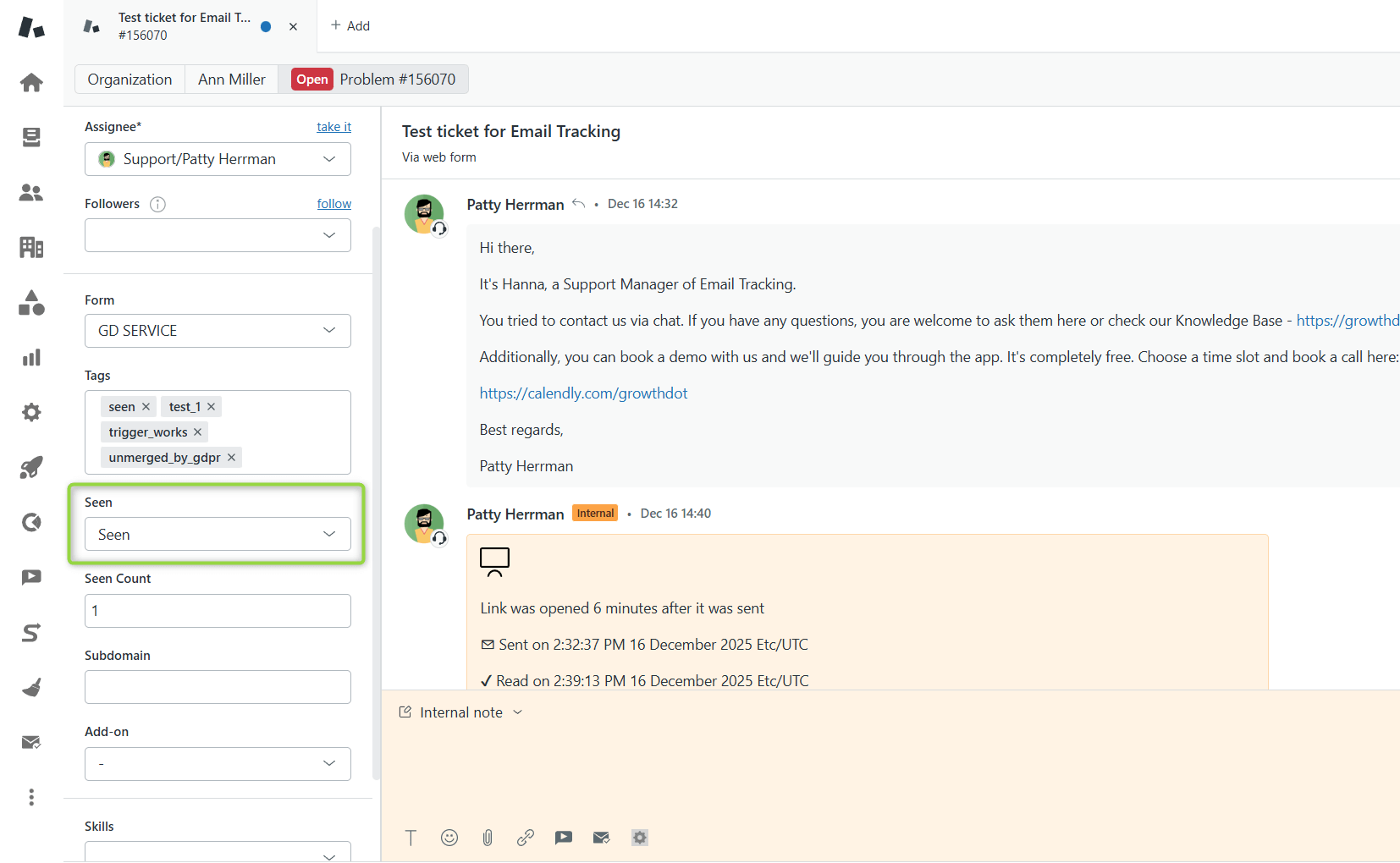
But that’s just the start, agents also benefit from:
- Automatic tags for easy filtering and quick organization
- Internal note “read receipts” that show exactly when a message has been seen
- A complete activity log in the sidebar showing email opens, clicks, and interactions
It’s a small change, but it can make a huge difference in agents' daily support workflow.

Know when customers open emails
Get free trialAnd while knowing who opened an email is powerful on its own, the real value comes when you take that information and organize it visually.
How to Organize Your Tickets Visually with Zendesk Kanban Boards
Bet you know the pain of juggling dozens of tickets at once. Some are urgent, some are waiting on customers, and some feel like they’ve been stuck in limbo forever. This is exactly where Kanban boards can make life a lot easier.
Kanban Pro for Zendesk lets you see all your tickets in a visual, organized layout. Each ticket lives in a column, so instead of scrolling endlessly through your queue, you can spot priorities instantly.
Columns can represent anything you want based on custom fields, such as status, priority, request types, and SLA deadlines, so you can drag and drop tickets as they move through your workflow.
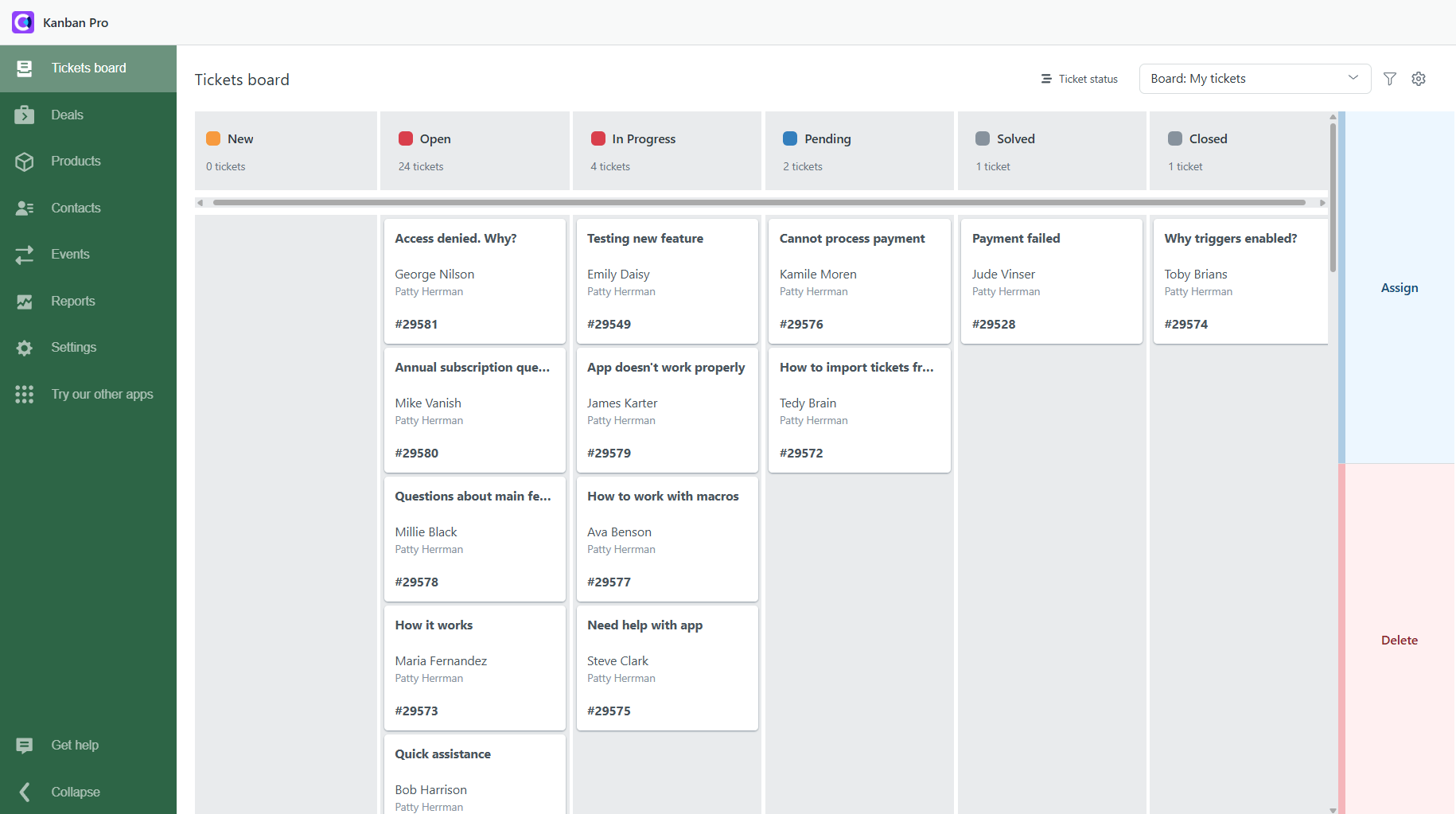
Ticket boards can help a lot to:
- See bottlenecks immediately
- Track ticket progress easily
- Quickly identify which tickets need attention
Kanban Pro turns what used to be a long, scrolling list into a clear, actionable overview, so you spend less time hunting for tickets and more time resolving them.
Visualize your ticket progress with Kanban board
Get free trialAnd here’s the best part: what if you could combine this visual clarity with real-time email engagement data? That’s exactly what happens when you bring Seen/Unseen status into your Zendesk Kanban board, which we’ll dive into next.
Combine Email Tracking and Kanban For Seen/Unseen Columns
As you’ve understood, Email Tracking shows a field in the ticket indicating whether a customer has opened your email. And Kanban Pro can turn any custom field into columns on your board. It means you can combine the two!
Here’s all you need to do:
1. After installing and setting up both apps in your Zendesk Support, open the Kanban Pro app and go to ticket boards.
2. By default, tickets are grouped by status. Click Ticket status above the board to change it.

3. From the dropdown, select the Seen field and apply.
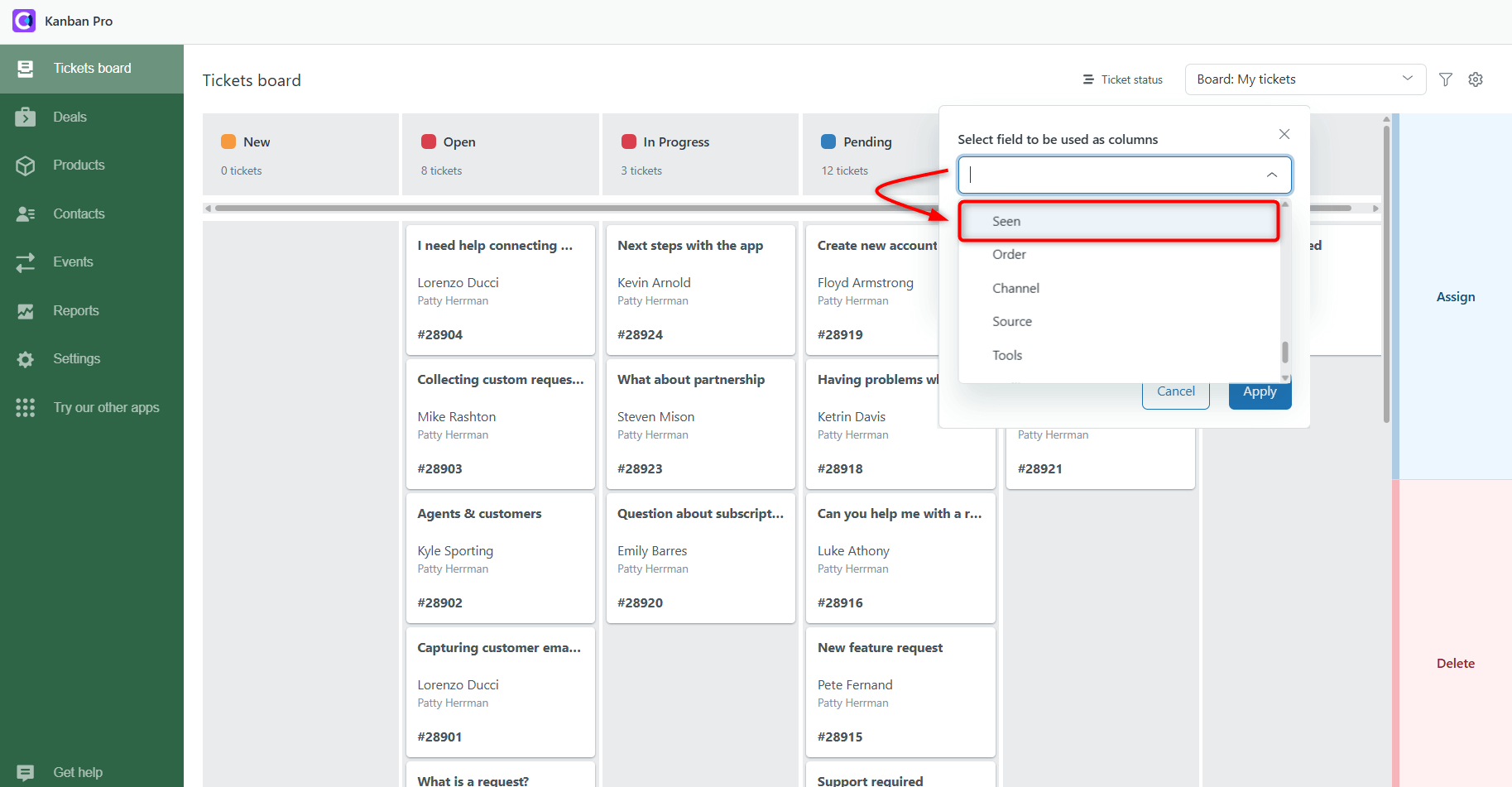
That’s it. Now you have a board with two clear columns:
- Unseen → tickets the customer hasn’t opened yet
- Seen → tickets where the customer has viewed your email
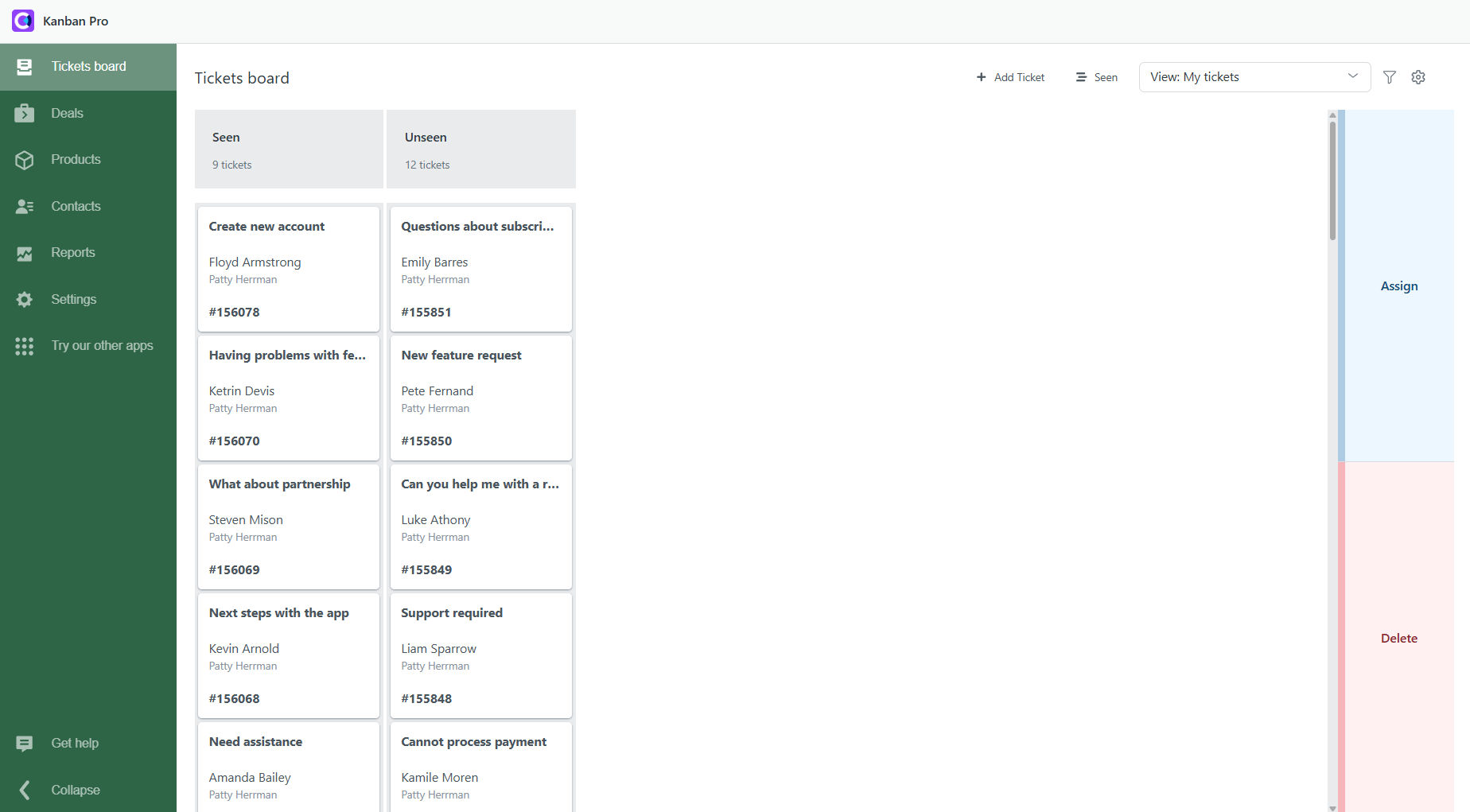
This setup gives agents an instant snapshot of customer engagement across all tickets. No more endless scrolling or guessing who to follow up with, you can focus on the tickets that truly need attention.
Key Benefits of a Seen/Unseen Kanban Board
Combining Email Tracking with Kanban Pro doesn’t just make your ticket list look prettier. It completely changes how agents manage their workload. Here’s why this setup is so powerful:
Instant Clarity on Customer Engagement
A Seen/Unseen Kanban board gives agents something they rarely get in Zendesk: real visibility into who’s actually engaging with their emails.
Instead of opening tickets one by one to check activity, agents can glance at the board and instantly see which customers have viewed their messages — and which haven’t opened them at all.
How does it help:
- Spot stalled conversations instantly
- Catch unopened emails before they turn into SLA risks
- Reduce back-and-forth guesswork inside the ticket
Smarter and Faster Prioritization
When tickets are organized into Seen and Unseen columns, prioritization becomes effortless. Tickets in the Unseen column often need immediate attention — maybe the customer missed your message, maybe it landed in spam, or maybe it needs a follow-up nudge. Meanwhile, tickets in Seen already show engagement, so agents can choose the next best step with confidence.
How does it help:
- Faster decision-making
- More reliable follow-up timing
- Fewer tickets are accidentally ignored or forgotten
Cleaner Workflow for Proactive Follow-Ups
A Seen/Unseen board naturally creates a self-cleaning workflow. Tickets don’t hide in long queues or get buried under new requests — and agents don’t need to remember who needs another email.
The board visually surfaces the tickets that require proactive action.
How does it help:
- Prevent stalled conversations before they become problems
- Send timely reminders based on real engagement
- Maintain steady momentum with customers
Conclusion
Tracking email opens is useful. Organizing tickets visually is useful. And combining both? That’s a super tool for Zendesk agents.
With a Seen/Unseen Kanban board, you get instant clarity, smarter prioritization, and a cleaner workflow, all in one glance.
Want to give it a try? Install Email Tracking and Kanban Pro in your Zendesk, start a 7-day free trial, and transform the way your team works today.